

Staying connected to the internet in China is essential for navigation, cashless payments, ride-hailing, and real-time translation. However, because mainland China operates the Great Firewall, standard international apps and websites—including Google (Google Maps, Gmail, Search), WhatsApp, Instagram, YouTube, and X (Twitter)—are inaccessible when connected to standard local Chinese Wi-Fi networks or local Chinese physical SIM cards.
Fortunately, international travelers in 2026 have a far simpler, 100% legal, and hassle-free solution: Travel eSIMs with built-in international data roaming. Because roaming data from international carriers routes through servers outside mainland China (typically Hong Kong, Singapore, or Japan), all Western apps, messaging platforms, and search engines work seamlessly out of the box—with zero VPN configuration required.
Quick Summary: Internet in China for Foreigners (2026)
1. How Travel eSIMs Bypass the Great Firewall Naturally
When you purchase an international travel eSIM designed for China (such as an Airalo Chinacom plan or Nomad China package), the underlying telecom profile is issued by carriers in regions like Hong Kong or Singapore. Under international GSMA roaming protocols, all cellular data packets are routed directly back through the home carrier’s gateway before reaching the open internet.
Travel eSIM (Roaming Data)
Pros: Zero VPN required. WhatsApp, Google Maps, Instagram, and work emails work 24/7. Instant digital delivery via QR code before departure.
Cons: Data-only (does not include a +86 local calling number, though VoIP calls work perfectly).
Local Physical SIM Card (+86)
Pros: Provides a Chinese phone number useful for certain local delivery apps.
Cons: Subject to full internet filtering. Requires passport registration queues at airport kiosks and separate standalone VPN apps.
2. Step-by-Step: How to Install & Activate a China eSIM
Installing an eSIM on an unlocked iPhone, Samsung Galaxy, or Google Pixel takes less than 3 minutes. It is strongly recommended to complete installation at home over stable Wi-Fi before boarding your flight.
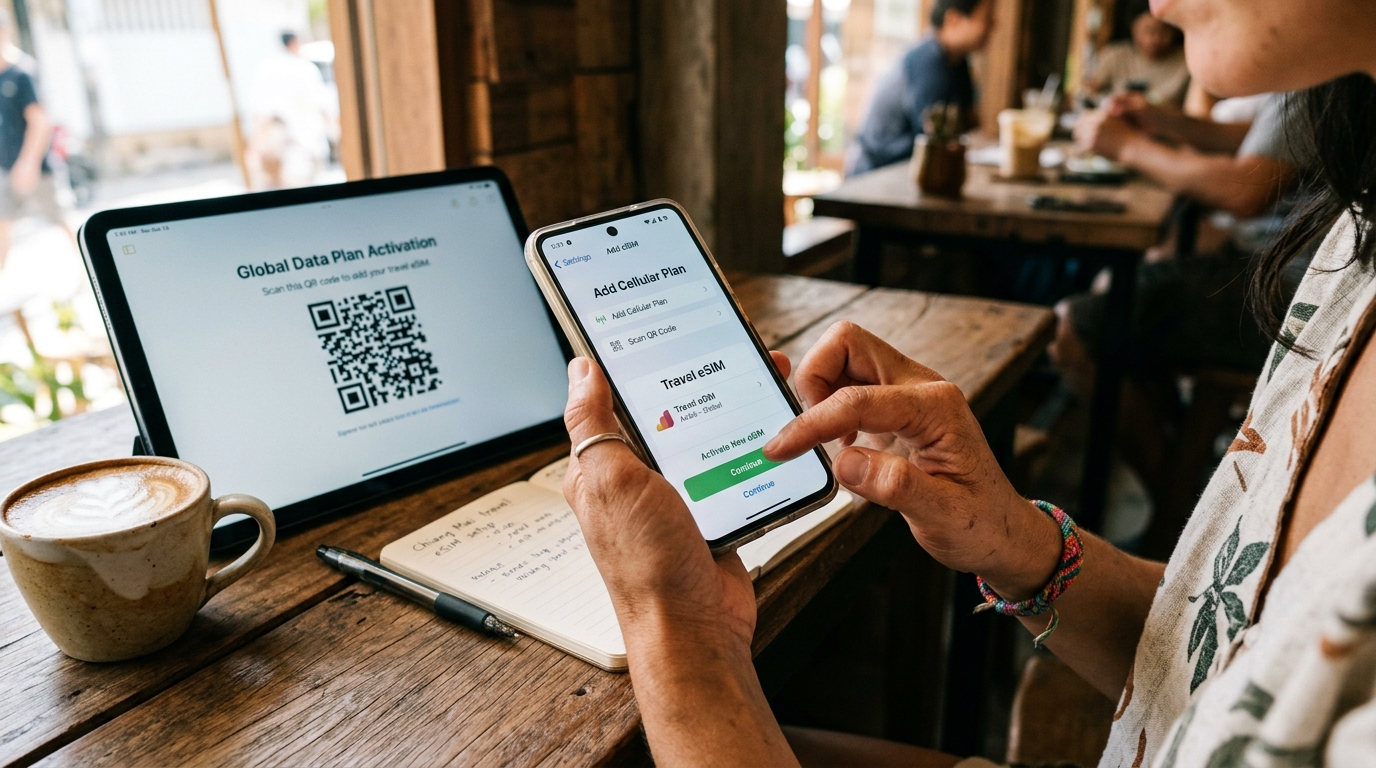
- Ensure Your Phone is Carrier-Unlocked: Check in your phone settings that your device is carrier-unlocked and compatible with eSIM technology.
- Purchase an eSIM Plan: Select your desired data package (e.g., 10GB for 15 days or 20GB for 30 days) from reputable providers like Nomad, Airalo, or Maya Mobile.
- Scan the Installation QR Code: On iOS, navigate to Settings → Cellular → Add eSIM and scan the QR code received via email. On Android, go to Settings → Network & Internet → SIMs → Add eSIM.
- Label Your SIMs Clearly: Label your home SIM as “Primary” and the new travel eSIM as “China Travel”.
- Activate Upon Landing: When your aircraft touches down in China, turn ON your travel eSIM line, set it as your Cellular Data source, and turn Data Roaming ON for the eSIM profile. Your phone will connect to China Mobile or China Unicom 5G within 60 seconds.
3. Essential Apps That Work Seamlessly with eSIM
With an active roaming eSIM, your phone functions identically to how it does at home:

- Navigation: Apple Maps works flawlessly in China with high-precision transit directions in English. Google Maps works via roaming eSIM data, though Apple Maps and Amap (Gaode) offer more updated local public transport data.
- Messaging & Social: WhatsApp, iMessage, Telegram, Instagram, and Facebook Messenger send and receive messages, media, and VoIP voice calls without interruptions.
- Productivity & Cloud: Gmail, Google Drive, Microsoft Outlook, Slack, and Zoom connect at full 5G speeds throughout urban and rural destinations.
4. Troubleshooting & Pro Tips for China Internet
- Hotel Wi-Fi Fallback: Remember that hotel Wi-Fi networks in China connect through mainland ISP gateways and are subject to firewall filtering. Use your eSIM cellular data hotspot whenever you need unrestricted access.
- Data Usage Optimization: Turn off automatic cloud backups (like iCloud Photos or Google Photos) over cellular data to conserve your roaming gigabyte allowance for maps, translation, and messaging.
- Backup Roaming: Keep your home carrier’s primary SIM active in dual-SIM mode with data roaming turned off, allowing you to receive two-factor SMS bank verification codes free of charge.